Sunday, December 17, 2006

CAML Queries return all items despite of filter

This had me puzzled for a while, so let me spare you the agony.

I was writing code that queried a list using the GetListItems function of the SPList object. The query I was using was from the U2U Caml Creator (great application, even with the bugs) and was working on that application perfectly - filtering my list to return only the items I wanted.
But in my web part the query would return all items in the list, ignoring the filter I set.

After some tests I found the problem. Apperantly the SPQuery object automatically wraps your query with the "<query>" tag, and since the U2U Caml Creator application also generates queries with the "<query>" tag, you actually have two "<query>" tags in your query, which makes sharepoint ignore the filters you set in the query.

So next time you are using the SPQuery object, remember the Query property should receive a CAML query, but without the "<query>" tag. Only whats under it.

Notes about Workflow

Lately I had to write some workflows in visual studio for the first time. I loved the interface, and the richness of options. I cant wait until I get to work with either K2 or Captaris and see how they enrich my workflow environment, but for now the built in workflow action that come with .net3 seem very cool.

I did have some problems though. On my development machine the "delay activity" wouldn't finish.
The delay activity is a cool way to tell the workflow to stop and wait for a specific time. We used it for task reminder setting - the workflow was supposed to wait until the task was due, and then send an email to the task owners. The way to do it is simple - in the delay activity "initializeTimeOutDuration" event you check the task list item "due date" field, and then calculate the time from that date to the "now" date, and set the "TimeoutDuration" property of the activity to that timespan.
The problem was- it didn't work!
After much research I got another machine going, and deployed the workflow there. works like a charm. I noticed that on my dev machine sharepoint is out of synch with the system clock. while the system clock said it was 10am, sharepoint was claiming it was 11am. I guess that messed up the workflow timer. I still don't know how to fix this.

Another interesting thing - The delay activity seems to operate in 10 minutes time units. There is no point in setting a delay activity to 1 second as opposed to 2 seconds or 10 seconds. both will fire at the next timer event which seems to occur once every so often (10 minutes? who knows?). So don't count on the engine for realtime applications (-:

The last thing I wanted to note was that the sharepoint "logToHistoryListActivity" is a great function to use to debug your workflow without going into code, not to mention it can be used to let users know the status of the workflow and what was done. But beware - appearntly each once of these activities can only store a limited amount of characters (my guess is 256, but I didn't check). So limit your logging to a minimum, and don't expect a stack trace to be properly logged there.

Did you notice? Microsoft.com went MOSSy


In case you didnt notice, Microsoft US site went all MOSSy on us. I guess they will be migrating regional sites soon, but now if you click the "change" button at the top, you get to a non-moss site and the Australian site is still the old one.


While I like the top of the page (regardless of the brown Zune which I think is pretty...hint hint if anyone is looking for a Hanuka gift for me), I think the grouping at the bottom look out of place from the look and feel. The font just isnt right. Also, the links at the top have a very strange on hover behavior - they get a dotted underline instead of the usual regular underline. At first I thought there may be some text wraped below the words - so strange!


The search isnt done by MOSS (big surprise? not really) and for some reason the "skip to contents" link (accessability!) is missing.


Since microsoft.com is one of the most viewed pages on the internet, I think its a very brave move by microsoft to MOSS it. The performance seems ok, and they probably did an impressive farm deployment there. I would love to read about it!

Thursday, December 14, 2006

Fixing the Sections Bug in the Edit User Profile Screen


The edit user profile screen is where users go to edit their details in the profile database.
In this tip I will show you how to get a nice looking screen with sections and headers, just like this:


If you ever looked at the administration page of the profile database properties, you must have noticed the "sections" - you can group properties by sections, so for example all contact information properties such as "mobile phone" and "phone number" and "Home address" are under one the "Contact Information" heading , while additional information such as "skills" are under the "Additional information"


Example of section grouping of user profile properties

What puzzled me is that this doesnt effect the "edit details" screen. I found that if you edit the EditProfile.aspx page (located at "Program Files\Common Files\Microsoft Shared\web server extensions\12\TEMPLATE\LAYOUTS\editprofile.aspx") you can set the edit the "ProfileEditor" control to have "ShowSections=true". This makes the edit profile page display the properties grouped by sections.


I actually liked the following combination of properties for look & feel:


ShowEditToolbar="true"

ShowMappedIcon="true"

ShowPublicIcon="false"

ShowSections ="true"

ShowWarningIcon="false"

MoveEditablePropertiesToTop = "false"

ShowOnlyVisibleOnViewer="true"

ShowTitle = "false"

UseProfileStyles = "true"


What messed things up for me is a Microsoft bug with this control having to do with the column span of the section header. The sections are rendered with column span of 3, when the rows below them have column span of 4. This makes for a very ugly appearance, when the section header is "cut off" at the end.


To fix that, I wrote a small script that I embedded in the file, just after the <table> closing tag. The script finds all the "div" elements that have the "ms-WPTitle" class, and then changes the columnspan of the parent "TD" element to 4.


  • Important - For the script to work, you also have to add an ID to the table that holds the edit profile control. I used in the script id="tblMain".


  • Important - The script has to be below the table, but within the asp:content block. dont try to place it at the very bottom of the page, or it will crash.


  • Important - Like always, I suggest you backup the original file before editing it.

I hope someone else will find it useful!


<script language="javascript">
function SetWPTitleToColspan4()
{
cssClassName = "ms-WPTitle";
var divs = tblMain.all.tags("DIV");
var currentDiv;
for(currentDiv=0;currentDiv<divs.length;currentDiv++)
{
var div = divs[currentDiv];
if(div.className.indexOf(cssClassName)==0)
div.parentElement.colSpan = 4;

}
}
SetWPTitleToColspan4();
</script>


Tuesday, December 12, 2006

Highest SharePoint Expert in Australia

Over the weekend the whole sharepoint team from Unique World (Canberra division) went to climb the highest peak in Australia. you can read about it in my personal blog if you want the whole grueling story including many pictures.


The team includes our esteemed leader & SharePoint MVP Gayan Peiris. But I was still the highest expert in Australia because he wouldnt climb to the top of the stone like I did.


The highest SharePoint Expert In Australia - just over 2228m


The Second Highest SharePoint Expert In Australia

Webparts on List Forms

Just a quick update on something I noticed that changed from beta to RTM. In beta, if you tried to add a web part to a list form (edit or new form) using SharePoint designer, the page would crash. So we had to develop our code in web controls instead.

In RTM the page is not crashing and we can keep the code in a web part.

Good news.

Thursday, November 30, 2006

Changes that you make to the "List View" Web Part are not retained after you save the site as a template

For those of you without the time to read the original article, basically what happens - when you save a site as template, the settings for web parts displaying lists are not always saved.

I had planned to post about this today and rant about how microsoft missed this, but they beat me to it and acknowledged this bug in the KB Article.

I just hope they give us a quick fix and we dont have to wait untill service pack. This really "uglies" our solutions.

Sunday, November 26, 2006

Plan for administrative and service accounts [Office SharePoint Server]

Ran across this great technet article explaining exactly what accounts you will need to set up sharepoint in production, and what level of permissions to give each one.
http://technet2.microsoft.com/Office/en-us/library/f07768d4-ca37-447a-a056-1a67d93ef5401033.mspx?pf=true

Search Highlighting For MOSS2007 (and 2003) - Update

This is an update to a year old post about a product that I helped write - the SharePoint Search String Highlighter. Apperantly my friends in KwizCom have added support to MOSS2007!

Before you say "but moss has search highlighting", let me remind you that this solution also highlights in the documents (word and pdf), and can also help you solve a problem that is usual with search results - make sure the links open in word and not in the browser (I hate when that happens).

So take a look - tell me what you think...

Wednesday, November 22, 2006

Announcing the SharePoint Tips Utility Pack!

update (13.2.2006)
I moved the download and released the open source to a codeplex open source project.
I also released version 1.1 which has some improved features on the field settings screen.

update (1.12.2006) - I moved the utility pack download to a better host- the Canberra SharePoint User Group site (which is where the application was first announced).
Please be patient when clicking the download link, as the user group site was not meant to be a file host and I guess the download can take a while to begin - but its a small file so when it does begin it wont take long.
I am also in contact with Microsoft to get the source code on codeplex - so stay tuned!

Its that time again - time for me to give away something I did for myself to the public.

This time its a pack of small utilities made to make life easier for me as a sharepoint 2007 deployer\administrator\consultant. I am constantly working on small utilities and scripts like these, and now I packaged some of these and I am letting you download it for free. At your own risk.

So hurry and download the SharePoint Tips Utility Pack. I will move the file to another file host service when I find a better one.

Oh, before I forget- to run this application you must run it on to the sharepoint server itself, and to set the trust level in the web.config file to "Full" or sharepoint will not allow the application to get to the data...

Here is what you get in the pack:

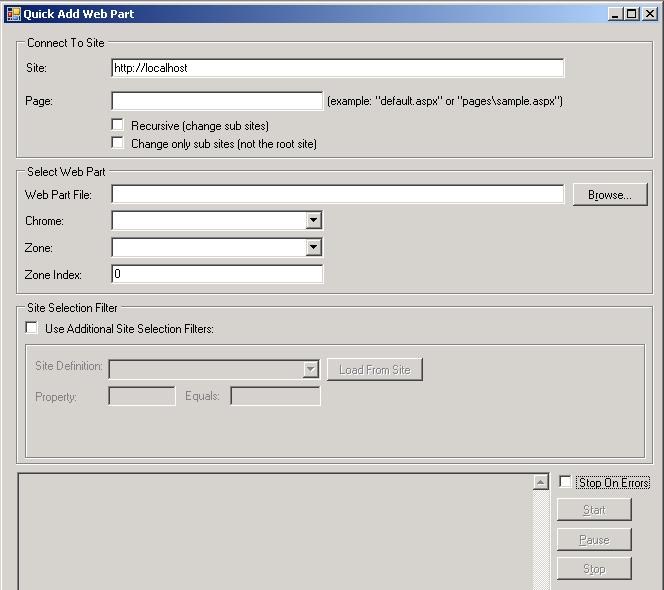
  1. A utility to push web parts to existing sites
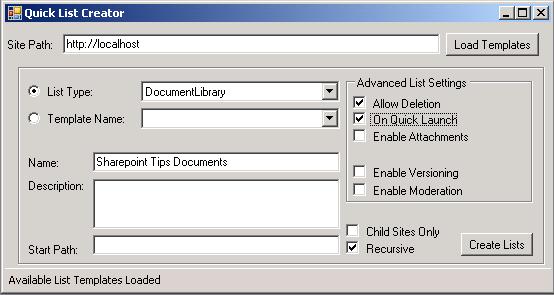
  2. A utility to create lists in existing sites
  3. A utility to delete sites recursively
  4. A utility to change list fields settings

I also plan to add to it my utility to register event handlers to lists - coming soon!
So please remember - I am open to suggestions and when I am able I will release the source code for the community benefit. kick it on SharePointKicks.com