Monday, October 19, 2009

Workflows & Site Templates and debugging projects in SP2010 and VS2010

I like the option to design workflows in Visio, load them and design them further in SharePoint Designer 2010 and then export that into a Visual Studio project (since only VS integrates with source control).

You can save a site as template - which gives you a WSP (say good bye to STP) file that has all the objects. Visual studio then can load that WSP and show you designers to edit the WSP.

When you debug a project using F5, only the project marked as startup gets deployed. The other projects in the solution do not get deployed unless you manually deploy them. And by "manually" I mean you right click them and select deploy (like with WSP builder!).

Visual studio - allows you to package, retract per project, has a special sharepoint browser that shows you the objects in a sharepoint site - much better integration.

Highlights - new in SharePoint 2010 for Developmers?

  • [Like]Web Part developer dashboard (will require sts command to be activated in the public beta) . As I said, it showss what SQL queries were executed, and you can click on the query to get more information of what was going on.
  • [Like]Visual web part development
  • [Like]Sandboxed solutions - you can upload a WSP to sharepoint - no STSADM command. it sits in the database - and someone with privilages can than use the code in the WSP - but it runs in a sandbox while sharepoint monitors the resources that it uses. Nothing is deployed to the file system (so you can version items properly, and you dont have to worry about multiple front end servers). Instead of using the sharepoint dll, the sandboxed solutions use a proxy dll. You can get logs from the proxy service that look at what the solution does.
  • [Like]debug web parts - when you "run" the solution, it automatically opens the "create page" dialog in the site you designated, so you can create a new page, and add the web part to it. Breakpoints will automatically break (because the code gets attached correctly to the processes). To do this, the VS solution is actually built and deployed before the debugging.
  • [Like]Linq for sharepoint - simply add a reference to the sharepoint linq dll, and
  • [Like].webpart files are the same format as 2007
  • Bussiness Connectivity Services - replaces the BDC.
    • [Like]This will have read\write.
    • [Don't Like]The sharepoint field types that expose the information were not upgraded, which means that a BCS column still will not allow multiselect.
    • [Like]Designer for the application definition in both VS2010 and SharePoint Designer 2010
  • [Like]Relationships between lists - you can prevent deletions or cause cascading deletions. However, no cascading inserts... but I guess this is where custom solutions come in.
  • Lookups to multiple columns
  • [Like]List query throttling - preventing views from showing too many items - this will be dynamic - each view evaluates on the fly and if a view is going to display more than a specific amount it can be blocked.
  • [Like]All views are XSLT views - not CAML (CAML can still be used) - this will make it a lot simpler to customize list definitions!
  • [Like]column validation - you have a new setting for columns, where you can write a forumla (excel style) and a message to show the user if the formal does not evaluate. FANSTATIC. Shame it only supports cecrtain types of fields.
  • [Like]REST API and client object model- need I say more? Client object model will allow you to connect to a site using a "ClientContext" object, that is instanciated with a site url parameter. REST, in case you don't know, allows you to get information from sharepoint using just URL's - and you get back an XML. So no more developing web services, now your client side code (javascript or different clients) can get the information just by building a URL, performing a http request to it, and getting back XML of the results. I have talked about this in the past in the blog about how you can do this in sharepoint 2007 - specifically how to get list and site information for an infopath form without using web services (there is a file called owssvr.dll in the _vti_bin virtual folder that gets you information from lists and sites), but in 2010 it will be a lot better integrated (and documented), not to mention the javascripting will have proxies built in and development will be easier. Note - when using the REST API using a .net application do not forget to set the credentials to the REST object. I wish MS would instantiate the object with the default credentials from the cache - that would save some lines.
  • [Like]After Synchrounous events in the event handlers! yay!
  • [Like]site scoped events
  • [Like]Workflows - integration with Visio (interesting...)
  • [Like]Upgrading code - MS provides assembly redirect for most of the sharepoint dll machines. This means that code that you wrote in 2007 has a good chance of working in 2010! This enables upgrades of a portal to be more smooth. It is still unclear to me how custom site definitions will be migrated.
  • Application life cycle management - generally better with TFS - no other mention of what is better so far.

News from the SharePoint Conference 2009 (part II)

I almost forgot - most exciting news is that November is public Beta time!

News from the SharePoint Conference 2009

Well, the show is on. The key note was done and I am sure a lot of people will start blogging like mad, so I will make an effort to contribute my thoughts. Unfortunately, this will be in more of a "thought of a day" (or "thought of a session") style - until I get time off my feet to write complete reviews of what I saw and what I think. But stay tuned as I do have a lot to say and tell you in the next few weeks, as I travel around the world to learn what is new in sharepoint
For now - some exciting tidbits:

  • SP2010 will support XHTML and WCAG standards
  • SP2010 will run on Vista and Windows7 for development!
  • SP2010 will have cross-farm content types for managing your taxonomy!
  • The replacement for BDC will finally allow you to do what you always wanted - show external databases as if they were sharepoint lists (including CRUD opperations)
  • When adding a web part to the page (page is in edit mode) you get a panel showing you the loading times for different lifecycle parts of the web part, the stack trace and the SQL commands sharepoint did for the web part, and how long each one took!
  • Web parts now have a visual editor in VS2010 - no more writing the UI in code
  • Client side model? I can't wait for that session to start...

Sunday, October 11, 2009

Selected pictures view does not work in Citrix

I wonder if anyone else can replicate this. My customer uses citrix to allow remote people to log in and use the intranet. When logged in, using IE8 through citrix, the "selected pictures" view in picture libraries doesnt work.
You go to a picture library, select a few pictures and then in the view selector you select the "selected pictures" view, and you get a view that shows you all the pictures, and does not show the checkboxes (some style issues there).
This is happening with a non-customized sharepoint site, and when you access the same list from a desktop on the network (so, not through citrix) there is no problem.
Anyone seen this? anyone solved this?

Wednesday, September 16, 2009

Retrieving the COM class factory for component with CLSID {3D42CCB1-4665-4620-92A3-478F47389230} failed

A code I was running against user profiles failed with the error: "Retrieving the COM class factory for component with CLSID {3D42CCB1-4665-4620-92A3-478F47389230} failed due to the following error: 80070422."
The reason was that the search service was disabled on the server, and since adding user profile properties that are indexed requires the search service, this error is understandable (although not very user friendly).
solution is obvious - start the search service.

Sunday, August 23, 2009

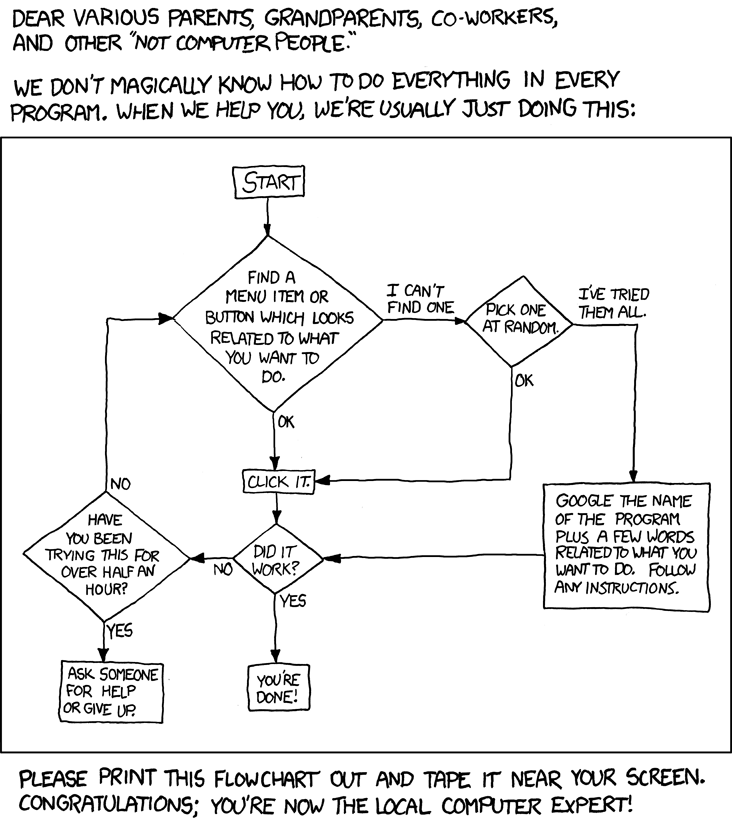
Tech Support Cheat Sheet

I actually did something similar when I was head of Microsoft Office Support in Israel in 2002 - regardless, if you are like me - the "computer expert" of the family, just email this to all your relatives and relax.

Tech Support Cheat Sheet

Wednesday, August 19, 2009

Web Parts – a developer and architect’s guide

Below are the slides from the presentation that I did in the SharePoint Saturday events in Sydney and Adelaide in the last two weeks. A lot of people asked me for it, but I am not sure how much help it can be to you if you haven't been there- since my presentations are more me talking and running demos, and less information from slides (I do love the sound of my own voice...).

If you still want to, here are the slides:


Oh - and credit to Fernando Felman for the wonderful list of links at the end. Here they are if you want to copy them:
http://en.wikipedia.org/wiki/ACID
http://www.codeplex.com/AppArchGuide
http://www.codeplex.com/AppArch
http://www.martinfowler.com/

Tuesday, August 18, 2009

Windows 2008 R2 goodness - adding sharepoint folders to a library

Just a heads up to what you can expect when you upgrade to Windows Server 2008 R2 (aside from all the technical things like virtualization improvements):

Win2008R2 is also known as “Windows 7 Server”, since the UI is windows 7 (unlike windows 2008 which was vista).

This means we can create “libraries” – which are virtual folders which replace the vista “search folder” with much more options.

An example is shown below – I created a virtual folder called “sharepoint files” and added the 12 hive and the office servers folders as well as the “logs” folder – and now I have an easy way to get to all three of them in windows explorer:
Bliss. Oh - can you see how I named my 2008 R2 machine?

Sunday, August 02, 2009

Creating Thesaurus files

I had a look at the excel file that Mauro Cardarelli wrote as a tool to generate thesaurus plans. While the tool is nice, I was dissapointed it did not include a facility to load an existing XML file and analyze it to see if it contains faults such as duplicates.

So what I did was write my own macro that loads a thesaurus file into Mauro's excel spreadsheet. The macro only loads expansions (as his spreadsheet does not deal with replacements) - but you can easily change it to load replacements if you want.

To use this macro, open Mauro's file, and open the visual basic window (alt-f11) and paste the procedure at the bottom of the "sheet1" module. To run it, either click the "run macro" button in excel, or from the VBA environment, hit F5 when the cursor is in the procedure. The macro will ask you for the path of the file, and will load it and populate the excel file.

Sub LoadThesaurusFile()
    Dim total As Integer
    total = 0
    Dim thesaurusFile As New DOMDocument
    Dim path As String
    path = InputBox("Path to the Thesaurus xml file", , ActiveWorkbook.path + "\thesaurus.xml")
    If (path = "") Then Exit Sub
    
    thesaurusFile.async = False
    thesaurusFile.validateOnParse = False
    'to avoid errors because of a thesaurus schema file, we will load the file as a text file, and then remove the schema reference
    Dim fs As TextStream
    Dim fso As New FileSystemObject
    Set fs = fso.OpenTextFile(path, ForReading, False, TristateUseDefault)
    s = fs.ReadAll
    s = Replace(s, "xmlns=""x-schema:tsSchema.xml""", "")

    Dim sht As Worksheet
    Set sht = ActiveSheet
    If (thesaurusFile.LoadXML(s)) Then
        Dim expansions As IXMLDOMNodeList
        Dim expansion As IXMLDOMNode
        Set expansions = thesaurusFile.FirstChild.SelectNodes("//expansion")
        'start from row 4
        Dim iCurrentRow As Integer
        iCurrentRow = 4
        'loop over the expansion tags, and populate the spreadsheet
        For i = 0 To expansions.Length - 1
            Dim iCurrentColumn As Integer
            Dim subs As IXMLDOMNodeList
            'load current exapnsion
            Set expansion = expansions.Item(i)
            'load the expansion subs
            Set subs = expansion.SelectNodes("sub")
            For iCurrentColumn = 0 To subs.Length - 1
                sht.Cells(iCurrentRow, iCurrentColumn + 1) = subs.Item(iCurrentColumn).Text
                total = total + 1
            Next iCurrentColumn
            iCurrentRow = iCurrentRow + 1
        Next i
        MsgBox ("Total entries: " & total)
   Else
    MsgBox ("Error loading the XML file: " + x.parseError.reason + vbCrLf + "Source:" + x.parseError.srcText + vbCrLf + "Link:" & x.parseError.Line)
   End If
   Set thesaurusFile = Nothing
   
End Sub