Monday, October 19, 2009

News from the SharePoint Conference 2009

Well, the show is on. The key note was done and I am sure a lot of people will start blogging like mad, so I will make an effort to contribute my thoughts. Unfortunately, this will be in more of a "thought of a day" (or "thought of a session") style - until I get time off my feet to write complete reviews of what I saw and what I think. But stay tuned as I do have a lot to say and tell you in the next few weeks, as I travel around the world to learn what is new in sharepoint
For now - some exciting tidbits:

  • SP2010 will support XHTML and WCAG standards
  • SP2010 will run on Vista and Windows7 for development!
  • SP2010 will have cross-farm content types for managing your taxonomy!
  • The replacement for BDC will finally allow you to do what you always wanted - show external databases as if they were sharepoint lists (including CRUD opperations)
  • When adding a web part to the page (page is in edit mode) you get a panel showing you the loading times for different lifecycle parts of the web part, the stack trace and the SQL commands sharepoint did for the web part, and how long each one took!
  • Web parts now have a visual editor in VS2010 - no more writing the UI in code
  • Client side model? I can't wait for that session to start...

Sunday, October 11, 2009

Selected pictures view does not work in Citrix

I wonder if anyone else can replicate this. My customer uses citrix to allow remote people to log in and use the intranet. When logged in, using IE8 through citrix, the "selected pictures" view in picture libraries doesnt work.
You go to a picture library, select a few pictures and then in the view selector you select the "selected pictures" view, and you get a view that shows you all the pictures, and does not show the checkboxes (some style issues there).
This is happening with a non-customized sharepoint site, and when you access the same list from a desktop on the network (so, not through citrix) there is no problem.
Anyone seen this? anyone solved this?

Wednesday, September 16, 2009

Retrieving the COM class factory for component with CLSID {3D42CCB1-4665-4620-92A3-478F47389230} failed

A code I was running against user profiles failed with the error: "Retrieving the COM class factory for component with CLSID {3D42CCB1-4665-4620-92A3-478F47389230} failed due to the following error: 80070422."
The reason was that the search service was disabled on the server, and since adding user profile properties that are indexed requires the search service, this error is understandable (although not very user friendly).
solution is obvious - start the search service.

Sunday, August 23, 2009

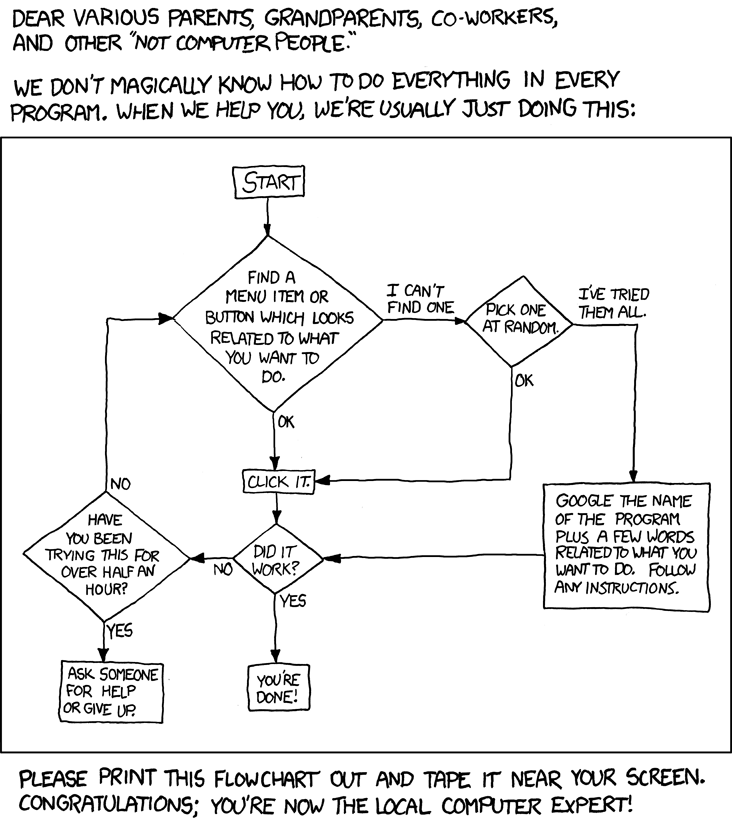
Tech Support Cheat Sheet

I actually did something similar when I was head of Microsoft Office Support in Israel in 2002 - regardless, if you are like me - the "computer expert" of the family, just email this to all your relatives and relax.

Tech Support Cheat Sheet

Wednesday, August 19, 2009

Web Parts – a developer and architect’s guide

Below are the slides from the presentation that I did in the SharePoint Saturday events in Sydney and Adelaide in the last two weeks. A lot of people asked me for it, but I am not sure how much help it can be to you if you haven't been there- since my presentations are more me talking and running demos, and less information from slides (I do love the sound of my own voice...).

If you still want to, here are the slides:


Oh - and credit to Fernando Felman for the wonderful list of links at the end. Here they are if you want to copy them:
http://en.wikipedia.org/wiki/ACID
http://www.codeplex.com/AppArchGuide
http://www.codeplex.com/AppArch
http://www.martinfowler.com/

Tuesday, August 18, 2009

Windows 2008 R2 goodness - adding sharepoint folders to a library

Just a heads up to what you can expect when you upgrade to Windows Server 2008 R2 (aside from all the technical things like virtualization improvements):

Win2008R2 is also known as “Windows 7 Server”, since the UI is windows 7 (unlike windows 2008 which was vista).

This means we can create “libraries” – which are virtual folders which replace the vista “search folder” with much more options.

An example is shown below – I created a virtual folder called “sharepoint files” and added the 12 hive and the office servers folders as well as the “logs” folder – and now I have an easy way to get to all three of them in windows explorer:
Bliss. Oh - can you see how I named my 2008 R2 machine?

Sunday, August 02, 2009

Creating Thesaurus files

I had a look at the excel file that Mauro Cardarelli wrote as a tool to generate thesaurus plans. While the tool is nice, I was dissapointed it did not include a facility to load an existing XML file and analyze it to see if it contains faults such as duplicates.

So what I did was write my own macro that loads a thesaurus file into Mauro's excel spreadsheet. The macro only loads expansions (as his spreadsheet does not deal with replacements) - but you can easily change it to load replacements if you want.

To use this macro, open Mauro's file, and open the visual basic window (alt-f11) and paste the procedure at the bottom of the "sheet1" module. To run it, either click the "run macro" button in excel, or from the VBA environment, hit F5 when the cursor is in the procedure. The macro will ask you for the path of the file, and will load it and populate the excel file.

Sub LoadThesaurusFile()
    Dim total As Integer
    total = 0
    Dim thesaurusFile As New DOMDocument
    Dim path As String
    path = InputBox("Path to the Thesaurus xml file", , ActiveWorkbook.path + "\thesaurus.xml")
    If (path = "") Then Exit Sub
    
    thesaurusFile.async = False
    thesaurusFile.validateOnParse = False
    'to avoid errors because of a thesaurus schema file, we will load the file as a text file, and then remove the schema reference
    Dim fs As TextStream
    Dim fso As New FileSystemObject
    Set fs = fso.OpenTextFile(path, ForReading, False, TristateUseDefault)
    s = fs.ReadAll
    s = Replace(s, "xmlns=""x-schema:tsSchema.xml""", "")

    Dim sht As Worksheet
    Set sht = ActiveSheet
    If (thesaurusFile.LoadXML(s)) Then
        Dim expansions As IXMLDOMNodeList
        Dim expansion As IXMLDOMNode
        Set expansions = thesaurusFile.FirstChild.SelectNodes("//expansion")
        'start from row 4
        Dim iCurrentRow As Integer
        iCurrentRow = 4
        'loop over the expansion tags, and populate the spreadsheet
        For i = 0 To expansions.Length - 1
            Dim iCurrentColumn As Integer
            Dim subs As IXMLDOMNodeList
            'load current exapnsion
            Set expansion = expansions.Item(i)
            'load the expansion subs
            Set subs = expansion.SelectNodes("sub")
            For iCurrentColumn = 0 To subs.Length - 1
                sht.Cells(iCurrentRow, iCurrentColumn + 1) = subs.Item(iCurrentColumn).Text
                total = total + 1
            Next iCurrentColumn
            iCurrentRow = iCurrentRow + 1
        Next i
        MsgBox ("Total entries: " & total)
   Else
    MsgBox ("Error loading the XML file: " + x.parseError.reason + vbCrLf + "Source:" + x.parseError.srcText + vbCrLf + "Link:" & x.parseError.Line)
   End If
   Set thesaurusFile = Nothing
   
End Sub

Sunday, July 19, 2009

In memory of a great sharepoint guy

Hi everyone.
If you followed this blog last year, you would have seen the blog post about Lee Marriage's death. Lee was a collegue who helped run the SharePoint user group in Sydney, and had a very useful sharepoint blog, and was a great guy all around.
Lee died last year in the Sydney "City to Surf" run from a heart attack. This year his friends are all going to do the run (or in some cases the walk) in his memory - while raising money for the Heart Research Institute.
If you can, please sponsor us on the everydayhero site: http://www.everydayhero.com.au/lee_marriage_groupies and donate a bit of money. I don't really care if you sponsor me specifically or any other member of the team.
thanks!

Sunday, July 12, 2009

Setting the navigation options for a meeting workspace

This is just wierd. I had to change the navigation options for a meeting workspace using code on a MOSS farm. The meeting workspaces were all under a publishing site, with the publishing feature turned on, so the option to inherit the navigation from the parent site is available in the UI.
However, there is no option to set it in the API.
When dealing with publishing sites, you can easily set it by using the PublishingWeb object instead of the SPWeb object - but using PublishingWeb.IsPublishingWeb on the event workspace returns false.
So I had a look at the code that runs when you click OK on the navigation settings page - and guess what? Microsoft doesnt check if the site is a publishing web or not - they just assume it is, and set the properties! So I did the same, and the code runs great. It doesnt matter that it is not a publishing web.
Code:
PublishingWeb pubWeb = PublishingWeb.GetPublishingWeb(web); pubWeb.InheritGlobalNavigation = true;

Australian IT people - Want to learn about sharepoint?

SharePoint Saturday is coming to Sydney
This upcoming event (the 8th of August 2009 at the Microsoft Sydney Office) is going to be an awesome event with a lot of sessions - all about sharepoint. Think TechED - but only for SharePoint.

Join SharePoint architects, developers, and other professionals that work with Microsoft Office SharePoint Server 2007 for ‘SharePoint Saturday’, on Saturday, August 8th, 2009. SharePoint Saturday will be an educational, informative & lively day filled with sessions from respected SharePoint professionals & MVPs, covering a wide variety of SharePoint-orientated topics. SharePoint Saturday is FREE, open to the public and is your local chance to immerse yourself in SharePoint!
It is free, and there are many prizes (including my book), and if you come you can hear me talk about developing web parts - General Meeting: How to build real world web parts where I will demonstrate how to build a web part for SharePoint from scratch, and then will demonstrate some of the most elusive best practices that web part developers need to know.

Other sessions available are:
Building a Bulletproof SharePoint Farm; Disaster Recovery and High Availability for SharePoint
What SharePoint Administrators should know about SQL Server
Building Process Driven Applications leveraging SharePoint
ASP.Net and SharePoint
Content Deployment Bootcamp
Blooming SharePoint (SharePoint UI customizations)
Geographically Distributed Deployments for SharePoint
SharePoint as a platform for enterprise mash-ups
SharePoint Document imaging - The paper-laden office is here to stay
MOSS 2007 – Architecture best practices from the field
SharePoint Designer: Working with the DataView Web Part
Leveraging SharePoint Web Services

This whole event was organized by my friend Brian Farnhill - who has a great SharePoint developer blog that you should check out if you didn't already, and by fellow MVP Ben Walters - also a great guy all around.